A productivity tool earns its subscription only if it gives you back real hours. Not “feels modern,” not “has AI in the name” — actually removes a task you used to do by hand. A chatbot that answers a question is useful. A tool that rebuilds your calendar the moment a meeting runs long, or writes your meeting notes while you talk, is a different category: it does the work, not just the talking.
So this guide sorts tools by the job they do, not by hype. For each one: what it is, the specific minutes or hours it saves, roughly what it costs, who it suits, and where it lets you down. Most people end up needing two or three of these, not the whole list. The trick is matching the tool to your actual bottleneck — which is usually one of six things: writing, scheduling, notes, meetings, email, or the tedious copy-paste between apps.
Writing and drafting
The biggest single time sink for most knowledge workers is the blank page. A good AI writing tool gets you to a rough draft you can edit, which is far faster than composing from nothing.
ChatGPT
ChatGPT is the default general-purpose drafting engine. Paste a messy outline, a half-formed thought, or three bullet points and it returns a structured first draft in seconds — emails, briefs, summaries, proposals. The Plus tier runs about $20 a month; there is a capable free tier and a cheaper ad-supported plan below Plus. Best for anyone who writes varied content all day and wants one tool that also handles research, data cleanup, and quick coding. Where it falls short: it does not live inside your other apps, so you are copying text in and out, and it will confidently invent facts, so anything load-bearing needs checking.
Claude
Claude is the writer’s pick when tone and judgment matter more than speed. It tends to produce longer, more careful prose, handles big documents well, and is better at “rewrite this so it sounds like a human” tasks. Pricing mirrors ChatGPT — a free tier, then Pro at around $20 a month, with higher Max tiers for heavy users. Best for people drafting nuanced writing, working through long documents, or who simply prefer its writing style. The caveat is the same copy-paste friction, and like every model it occasionally gets facts wrong.
Grammarly
Grammarly is the editing layer, not the drafting one. It runs in real time inside your email, docs, and browser, fixing grammar and adjusting tone without a copy-paste round trip, and now drafts and rewrites full sentences from a prompt. Free tier covers core corrections; Premium is around $12 a month billed annually. Best for everyone who writes for work and wants a final check everywhere they type. It is weaker as a from-scratch generator than ChatGPT or Claude, and its suggestions can flatten a distinctive voice if you accept them all.
Scheduling and focus time
This is where AI quietly saves the most invisible time: the planning and re-planning you do every time your day gets interrupted. For a deeper look, see our guide to AI scheduling and calendar assistants.
Motion
Motion takes your tasks, deadlines, and meetings and auto-slots everything into your calendar, then reshuffles in real time when something runs over or a new priority lands. The payoff: you stop spending the first twenty minutes of each morning deciding what to do. It is not cheap — plans start around $29 per user per month billed annually and climb from there, and the trial wants a card upfront. Best for people drowning in tasks who want one app to run their whole workload. The downsides: the price stings, and the constant auto-rescheduling can feel like it is moving your day around without asking.
Reclaim.ai
Reclaim.ai does the lighter version of the same idea, and does it well. It defends focus blocks, schedules recurring habits, and pulls tasks from Todoist, Asana, and Linear straight into Google Calendar, adjusting as your week shifts. There is a genuinely useful free tier; paid plans start around $8 to $12 per user per month. Best for someone who mainly wants to protect deep-work time and sync tasks without paying Motion money. The limit: it is Google Calendar-centric and is a scheduler, not a full task manager, so you still need somewhere to keep the tasks themselves.
Notes and knowledge
The job here is recall: finding the thing you wrote down three weeks ago, and turning rough notes into something usable. More options in our roundup of AI note-taking apps.
Notion AI
Notion AI sits on top of the Notion workspace many teams already use, so it can search across everything you have written, summarize long pages, and now run multi-step agents that build a tracker from a meeting summary or pull a database out of a document. The catch as of 2026: full Notion AI is bundled into the Business plan, around $20 per user per month, rather than sold as a cheap add-on. Best for individuals and teams already living in Notion who want their notes to become searchable and actionable. If you do not already use Notion, adopting the whole platform just for its AI is a heavy lift, and the credit-based pricing for custom agents adds cost on top.
Meetings and transcription
If you sit in calls, an AI notetaker is the highest-leverage tool on this list: it gives you back the act of writing notes and the act of remembering what was said. See our full guide to AI meeting note-takers, and how to use AI to summarize meetings, emails, and documents.
Otter.ai
Otter.ai joins your Zoom, Teams, or Google Meet calls, transcribes in real time, identifies speakers, and produces a summary with action items the moment the call ends. The time saved is concrete: you stop half-listening while scribbling, and you get a searchable record instead of half-legible notes. The free Basic tier gives 300 minutes a month; Pro is around $8 to $17 per month depending on billing, Business more. Best for anyone in back-to-back meetings who needs reliable records. Weaknesses: accuracy drops with heavy accents, crosstalk, and jargon, and auto-summaries still need a human glance before you forward them.
Email is the task that expands to fill whatever time you give it. The right tool compresses it. For the broader category, see AI email assistants.
Superhuman
Superhuman is built around speed: keyboard shortcuts for everything, plus AI that drafts replies in your voice, summarizes long threads, and auto-labels your inbox so you triage faster. Regular users genuinely clear email in a fraction of the time. It is not cheap at around $30 a month, and it sits on top of Gmail or Outlook rather than replacing your provider. Grammarly acquired Superhuman in July 2025 and then rebranded the whole company as Superhuman in October 2025 — the email product keeps shipping AI features under the combined platform. Best for high-volume email people whose inbox is the job. Skip it if you get a dozen emails a day — the price only makes sense at volume, and there is a real learning curve to the shortcuts.
Task automation and glue
The last category is the tedium between apps: the copy-paste, the retyping, the “now I have to put this in the other system.” Two kinds of tool help — a task manager to hold the work, and an automation layer to move data without you. More on this in our guide to automate repetitive work tasks with AI.
Todoist
Todoist is the lightweight task manager that now adds AI: it breaks big tasks into steps, parses dictated voice notes into structured items with due dates, and pulls action items out of forwarded emails. Pro runs around $4 to $5 a month; there is a solid free tier. Best for people who want a fast, no-fuss list that plays nicely with schedulers like Reclaim. It is deliberately simple, so if you need full project management with timelines and team workflows, you will outgrow it.
Zapier
Zapier is the connective tissue. It links thousands of apps so a finished Otter transcript, a new form submission, or a completed Todoist task triggers the next step automatically, no retyping. Its 2026 Copilot turns a plain-English description into a draft automation. Free tier covers 100 tasks a month; paid plans start around $20 a month, with AI agents as a paid add-on. Best for anyone who notices themselves doing the same copy-paste daily. The honest caveats: building reliable flows takes patience, and task-based pricing climbs quickly once you automate a lot.
Raycast
Raycast is the Mac power user’s launcher: a keyboard command bar that handles clipboard history, snippets, window management, app launching, and AI chat without leaving the keyboard. The time saved is in friction removed — dozens of tiny context switches a day collapse into a keystroke. Free tier is generous and permanent; Pro with AI is around $8 a month. Best for Mac users who want to stop reaching for the mouse. The obvious limit: it is Mac-first (Windows is still in beta), so it is a non-starter for most Windows shops.
How the picks compare
| Tool | Best for | Pricing tier | One-line verdict |
|---|---|---|---|
| ChatGPT | All-purpose drafting and research | Free / ~$20 mo | The default first draft engine for almost any writing. |
| Claude | Nuanced writing and long documents | Free / ~$20 mo | Better voice and judgment; same copy-paste friction. |
| Grammarly | Always-on editing everywhere you type | Free / ~$12 mo | The final-check layer, not the drafter. |
| Motion | Running your whole workload in one calendar | ~$29+ user/mo | Powerful auto-scheduling, but expensive and pushy. |
| Reclaim.ai | Protecting focus time on a budget | Free / ~$8-12 user/mo | Lighter, cheaper scheduling that just works. |
| Notion AI | Searchable notes that become tasks | ~$20 user/mo (Business) | Great if you already live in Notion. |
| Otter.ai | Meeting transcripts and summaries | Free / ~$8-17 mo | Highest leverage if you sit in calls all day. |
| Superhuman | Clearing a high-volume inbox fast | ~$30 mo | Worth it only if email is the job. |
| Todoist | A fast, simple task list | Free / ~$4-5 mo | Clean tasks that sync into your scheduler. |
| Zapier | Moving data between apps automatically | Free / ~$20+ mo | The glue that kills daily copy-paste. |
| Raycast | Keyboard-driven speed on Mac | Free / ~$8 mo | Removes a hundred tiny clicks a day. |
Prices are mid-2026 ballparks; confirm current pricing before subscribing, since several of these changed plans this year.
How to pick (and not end up paying for five subscriptions)
Start with where your hours actually go. Track your week honestly — most people are surprised by how much time disappears into one or two activities. Then buy the single tool that attacks that bottleneck, use it for a month, and only add a second once the first is paying for itself.
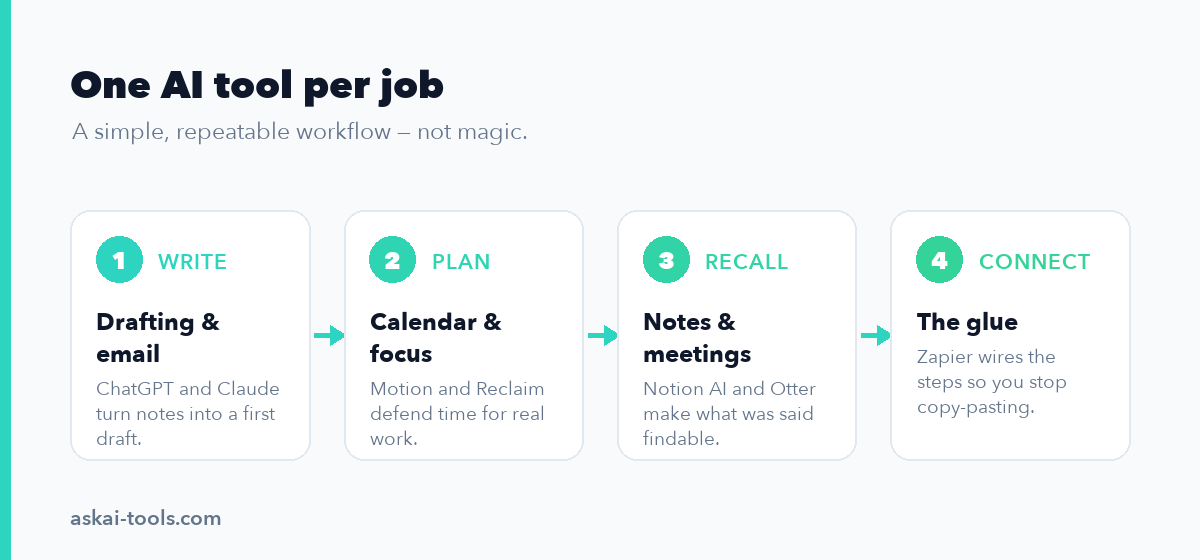
A sensible default stack for one person is three tools, not ten: one writing assistant (ChatGPT or Claude, plus Grammarly for the always-on editor), one scheduling or task tool (Reclaim for cheap focus protection, Motion to run everything, Todoist for a plain list), and an Otter-style notetaker if meetings fill your calendar. Add Zapier or Raycast later, once you have a specific repetitive task to kill — automation you do not need is just another subscription.
Two things to watch. Overlapping tools quietly stack up: ChatGPT, Notion AI, and Grammarly can all draft text, so paying for all three at full tier is often waste. And lean on free tiers longer than you think — Reclaim, Otter, Todoist, ChatGPT, and Claude all have real free plans. The moment you hit a hard limit is the moment to pay, not before.
The fastest worker is rarely the one with the most tools. It is the one who picked two or three that match their actual day and learned them well enough to stop thinking about them.