Most knowledge work is not one job. It is one job buried under a pile of small, repetitive tasks: sorting email, copying a figure from one tab into another, formatting the same report every Monday, chasing people to book a call. None of it needs your expertise. All of it eats your week.
The good news in 2026 is that this exact category — high-volume, low-judgment work — is what AI automation now handles reliably. The trick is knowing which tasks to hand off, which tool fits which job, and where to keep a human in the loop so a confident machine doesn’t quietly make the same mistake five hundred times.
Start here: which tasks are worth automating
Before touching a tool, sort your work on two axes: how often a task repeats, and how much judgment it needs. The sweet spot is the top-left corner — things you do constantly that follow predictable rules.
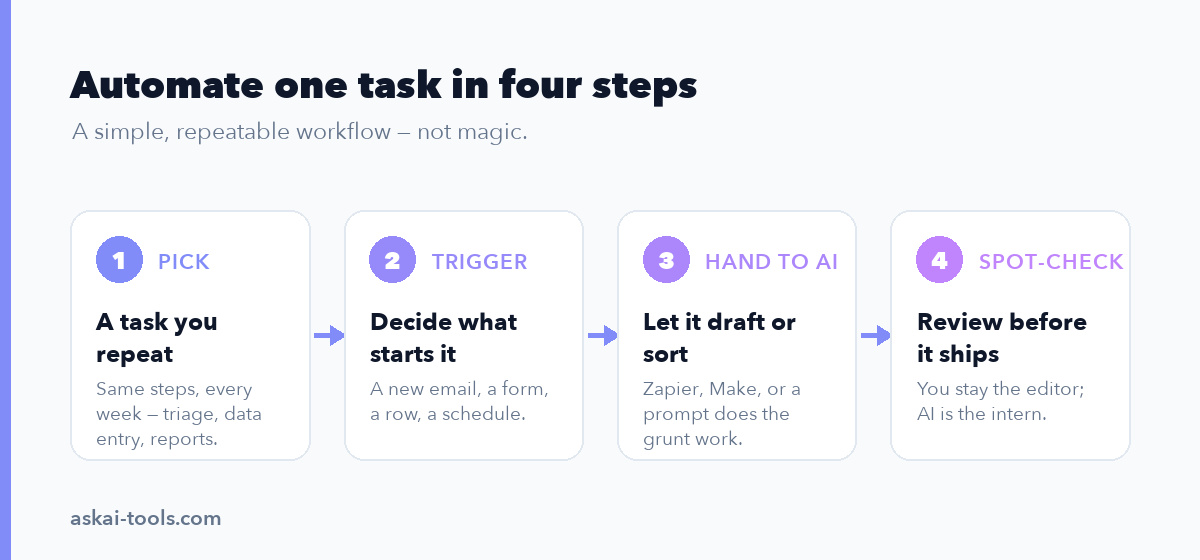
Good first candidates share three traits. They happen on a schedule or a clear trigger (“when an email arrives,” “every Friday at 9am”). They follow rules you could write down. And a mistake is cheap to catch and easy to undo. Sorting an email into the wrong folder costs nothing. Wiring an invoice to auto-pay does not belong in your first month.
Be honest about volume, too. Automating something you do twice a year is a hobby, not a time save. Pick the task you’re sick of this week.
| Task type | Best-fit tool | Setup effort |
|---|---|---|
| Email triage & first-draft replies | ChatGPT / Claude + Gmail or Outlook AI | Low |
| Data entry between apps | Zapier or Make | Low–medium |
| Scheduling & calendar | Native AI scheduler + connector | Low |
| Recurring reports & summaries | Make or Power Automate + a chat model | Medium |
| Invoice & document handling | Power Automate or Make + AI extraction | Medium–high |
| Content repurposing | Zapier or n8n + ChatGPT/Claude | Medium |
Email and inbox triage
Email is where most people feel the drag first, and it’s the easiest win. The pattern: an AI reads each incoming message, decides what it is, and either files it, drafts a reply, or flags the few that actually need you.
The native route is simplest. Gmail and Outlook both ship AI features in 2026 that summarize threads and draft responses in your style. For sorting logic beyond what they offer, connect your inbox to Zapier or Make and route messages to a model. A workable setup: trigger on new email, send the body to ChatGPT or Claude with a prompt like “categorize this as sales lead, support, newsletter, or personal, and draft a two-line reply if it’s a lead,” then file and draft accordingly. If you want help choosing between the dedicated options, our roundup of AI email assistants compares them head to head.
One honest caveat: never let AI auto-send replies to people outside your team early on. Draft, don’t send, and read the first hundred drafts. The model gets tone wrong on the awkward emails — the upset client, the sensitive negotiation — which are exactly the ones you can’t afford to fumble.
Data entry and extraction
Copying data between systems is the purest form of busywork, and it’s where connector tools earn their keep. The classic example: a form submission needs to land in your CRM, a spreadsheet, and a billing tool, each formatted slightly differently. Zapier and Make were built for exactly this — a trigger fires, data flows to several destinations, no copy-paste.
AI extends this to unstructured input. When the source is a messy email, a PDF, or free-text notes, a chat model in the middle of the workflow pulls out the fields you need. Feed Claude or ChatGPT a forwarded email and ask it to return the company name, contact, and budget as clean JSON, then push that into your CRM. This is genuinely reliable for well-formatted inputs.
It is less reliable than it looks for the weird ones. An extraction model that’s right 95% of the time sounds great until you remember that’s one error in twenty, made silently, at machine speed. For anything financial or contractual, route the AI’s output to a human for a glance before it commits. The pattern is “AI proposes, person approves.”
Scheduling and calendar management
The back-and-forth of finding a meeting time is pure overhead. In 2026, the cleanest fix is still a scheduling link that lets people self-book against your real availability, now with AI on top to handle the natural-language requests — “find 30 minutes with the design team next week” — and to reshuffle when things collide.
Both ChatGPT and Claude can connect to your calendar through their app integrations and propose times, and ChatGPT’s scheduled Tasks can fire recurring jobs like a Monday-morning agenda summary. For team scheduling tied to other apps, wire a connector so a booked call automatically creates the calendar event, sends a prep doc, and posts to your team channel. The automation isn’t the booking itself; it’s everything that used to happen manually around it.
Recurring reports and summaries
If you rebuild the same report every week, you’ve found your highest-leverage automation. The shape is always similar: pull numbers from a few sources, arrange them, write a short narrative, send it to the same people.
Split the job. Use Make or Microsoft Power Automate to gather the data on a schedule — sales from the CRM, traffic from analytics, spend from the ad platform. Then hand the assembled numbers to a chat model with a prompt that asks for a plain-language summary: what moved, what didn’t, what’s worth a look. Power Automate is the natural pick if your data already lives in Microsoft 365; Make is more flexible across mixed toolsets. The same split — fetch with a connector, write with a model — also drives the workflows in our guide to using AI to summarize meetings, emails, and documents.
Watch the numbers, though. A language model can misread a table or invent a trend that isn’t there. Have it summarize figures you’ve already computed in the connector — don’t ask it to do the math. Models are for prose, not arithmetic.
Document and invoice handling
Processing invoices, receipts, and forms blends extraction with routing, and it’s where Power Automate and Make pull ahead because they integrate with document-AI features that read structured files. An invoice arrives, the AI pulls vendor, amount, and date, the workflow matches it against a purchase order and files it for approval.
This saves real hours in finance and ops, but it’s the area I’d automate most carefully. Anything that moves money needs a person in the loop, full stop. Build the workflow to do the tedious 90% — read, extract, match, file — then stop at a clear approval step before payment. A model that confidently reads “$1,500” as “$15,000” on one invoice in a thousand is a problem you only notice after it pays out.
Social and content repurposing
One piece of content should become ten. A blog post becomes a newsletter, five social posts, and a short summary; a recorded talk becomes clips and notes. This is repetitive reformatting, which AI does well.
Set up a workflow in n8n or Zapier that triggers when you publish, sends the source to ChatGPT or Claude with format-specific prompts (“turn this into three LinkedIn posts in my voice”), and drafts each version into a queue for review. n8n is the better choice if you’re technical and want to self-host to control costs at high volume; Zapier is faster to stand up. For deeper builds, Claude is strong for workflow automation because it handles long, nuanced source material well. Keep the human review step — voice and accuracy still need a person before anything goes public.
The main tools, compared
| Tool | Best for | Pricing tier |
|---|---|---|
| Zapier | Fastest no-code app connections; huge integration library | Free tier; paid starts in the low tens of dollars/month |
| Make | Visual, granular control; cost-efficient at volume | Free tier; paid starts around $9/month |
| Power Automate | Microsoft 365 shops; document and approval flows | Bundled with M365 plans; premium connectors cost extra |
| n8n | Technical teams; self-hosting to control cost | Free self-hosted; cloud starts in the low tens/month |
| ChatGPT | Reading, writing, scheduled Tasks, app connectors | Free tier; Plus around $20/user/month |
| Claude | Long, nuanced text; document-heavy workflows | Free tier; Pro around $20/user/month |
Most setups combine two: a connector to move data and a chat model to process it. If you want the broader category map, see our overview of the best AI agents and of no-code AI agent builders. Verify current pricing on each vendor’s site before you commit — plans shift, and AI steps are increasingly metered by usage rather than included flat.
Where AI automation still breaks
The failure modes are consistent, and knowing them is what separates a time-saver from a time-bomb.
AI breaks on edge cases. Workflows tuned on typical inputs stumble the moment something arrives in an unexpected format, and the model rarely says “I’m not sure” — it guesses, confidently, and keeps going. It breaks on judgment: anything requiring taste, ethics, negotiation, or accountability still needs a person. And it breaks silently at scale, which is the dangerous one. A human doing data entry catches their own odd mistake; an automation makes the same error a thousand times before anyone looks.
Two tradeoffs worth naming. First, automation has upkeep — apps change their interfaces, prompts drift, and a workflow you forgot about can fail quietly for weeks. Budget time to monitor, not just to build. Second, usage-metered AI pricing means a workflow that’s cheap in testing can get expensive when it runs ten thousand times a month. Check the per-run cost before you scale something up.
Pick one task and start this week
Don’t try to automate your whole job. Pick the single task you’re most tired of — the one you’ll do again in the next few days — and automate just that, end to end. If it’s email, start with AI-drafted (not sent) replies. If it’s a weekly report, wire the data pull and let a model write the summary. Use the free tier, keep yourself in the approval loop, and run it for a week before adding anything else.
The people getting hours back in 2026 aren’t the ones with the most elaborate setups. They’re the ones who automated one annoying thing, trusted it, and then did it again. For more options once you’ve got the first one running, our guide to the best AI productivity tools is a good next stop.