Ask a chatbot to “summarize this” and you get something that reads well and is quietly wrong in the places that matter. It compresses a 90-minute negotiation into five tidy bullets, smooths over the one objection that actually killed the deal, and confidently assigns a deadline nobody agreed to. The summary isn’t useless. It’s just untrustworthy in exactly the way a busy person is least likely to catch.
The fix is not a better tool. It’s matching the right tool to the source, prompting for a summary you can verify instead of one that merely sounds finished, and knowing the two or three mistakes AI makes every single time so you can check for them in ten seconds. Below is the workflow scenario by scenario — recordings, email threads, PDFs, research piles, and video — plus the prompts and the checks that separate a summary you can forward from one that gets you in trouble.
Meetings and calls
For anything live, don’t record audio and paste a transcript into a chatbot later. Use a tool built to sit in the call. Otter.ai and Fireflies.ai both join Zoom, Google Meet, and Microsoft Teams, transcribe in real time, and drop a summary with action items into your inbox within a minute of hanging up. Fathom does the same and is notable for an unusually generous free tier; it also has a Mac mode that captures audio locally instead of sending a bot into the call, which spares everyone the “who just joined?” moment.
If your company runs on Microsoft, Microsoft 365 Copilot summarizes Teams meetings natively, including who said what, and it works even if you join late by catching you up on what you missed. For deeper comparisons of the category, our roundup of AI meeting note-takers breaks down which fits which workflow.
Two honest caveats. First, these tools are weakest exactly where meetings are most human: cross-talk, sarcasm, and the moment three people half-agree to something nobody formally decided. The summary will often record a “decision” that was really just the loudest person trailing off unchallenged. Second, recording has legal and social weight — get consent, and know your jurisdiction’s rules. The action-items list is the part to scrutinize hardest, because a misattributed task (“Sarah will send the contract”) becomes real the moment it lands in someone’s inbox.
Long email threads
A 40-reply thread where the actual decision is buried in message 31 is the perfect AI summary job. If you live in Gmail or Outlook, start with what’s already there. Google Gemini summarizes a Gmail thread in a click and returns the key decisions, action items, and unresolved questions; Copilot in Outlook does the equivalent and can also summarize an attached PDF or Word file in the same pass.
When you need more than the gist — say you’re catching up on a thread you’ll be held accountable for — paste the full thread into ChatGPT or Claude and ask specifically for the decision reached, what each person committed to, and what’s still open. That framing matters: “summarize this” gives you a tidy recap, while “what did each person agree to do” gives you something you can act on. Our guide to AI email assistants covers the inbox-native options in depth.
The failure mode here is subtle. Email threads contain reversals — someone proposes a date in message 12, then retracts it in message 28. A summary that reports the proposal but misses the retraction is worse than no summary, because it reads as authoritative. Always have the AI flag where a position changed.
PDFs, contracts, and reports
For a long PDF, contract, or quarterly report, the document chatbots are the right call. Claude and ChatGPT both let you upload files directly. Claude is especially strong on very long documents — it tends to load the whole file into context and read it end to end, which means it can genuinely compare a clause in section 2 against one in section 9 rather than answering from whichever fragment it happened to retrieve. That’s the difference between a summary and a search result dressed up as one.
For documents you’re already editing, the assistant inside the app is fastest: Gemini summarizes a Google Doc (including across tabs), and Notion AI summarizes a Notion page and can roll a summary into a database property automatically.
The caveat for high-stakes documents is non-negotiable: AI is good at telling you what a contract says and bad at telling you what it means for you. It will summarize an indemnification clause accurately and completely miss that the clause is one-sided against you. Use it to find and condense, never as a substitute for a lawyer or accountant on anything that carries real liability. And always ask it to quote the source line for any claim you plan to rely on — a paraphrase can drift; a quote can’t.
Research across many sources
When the job is synthesizing across ten papers, a stack of reports, and your own notes — not summarizing one thing — reach for NotebookLM. It’s Google’s source-grounded research tool: you upload your sources, and every answer it gives is anchored with inline citations back to the exact document and passage. As of mid-2026 it handles a large set of sources per notebook and can turn them into mind maps, audio overviews, and study aids. The citation grounding is the whole point — it makes verification a two-second click instead of a hunt.
This is also the right place for a literature review or competitive scan, where you need claims traceable to specific sources rather than blended into a confident paragraph. For the broader category, see our rundown of AI deep research tools.
The trap with multi-source summaries is false consensus. Ask AI to summarize ten articles and it will hand you the median view as if it were settled fact, quietly burying the two sources that disagreed. When the disagreement is the interesting part, you’ve lost it. Always ask explicitly: where do these sources conflict?
Videos and webinars
For a recorded talk, webinar, or YouTube video, the fastest route is the transcript. Many platforms expose one; paste it into ChatGPT or Claude and ask for the key arguments plus timestamps so you can jump back to anything that matters. NotebookLM also accepts video and audio sources directly, which is the better choice when the video is one input among several you’re researching. The same dropped-nuance and invented-detail risks apply — a transcript-based summary is only as good as the transcript, and auto-generated transcripts mangle names, jargon, and numbers constantly.
Prompts that produce summaries you can trust
The default “summarize this” prompt optimizes for something that sounds complete. These don’t:
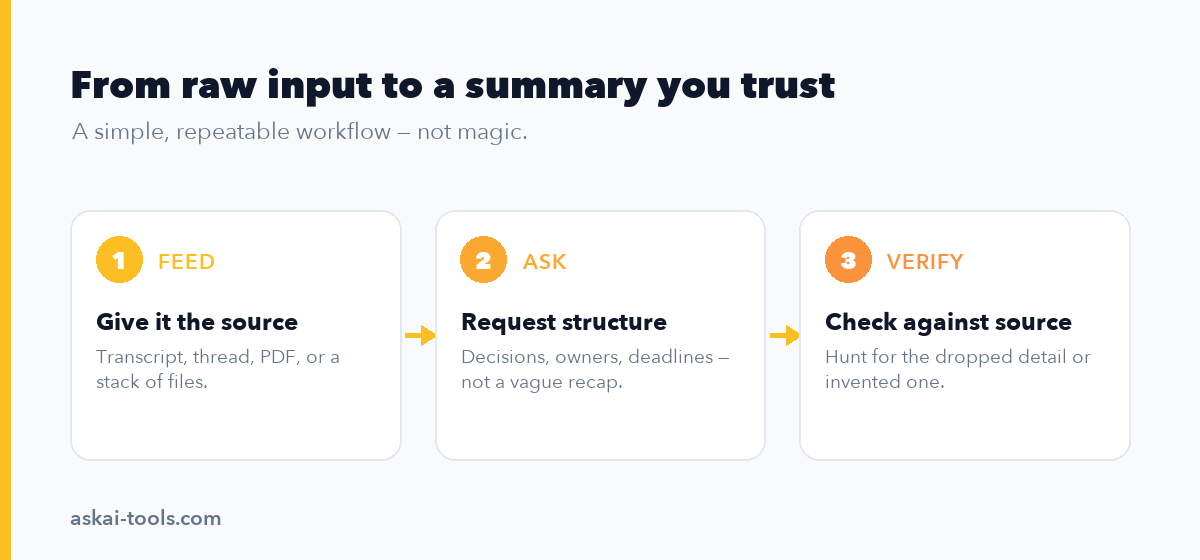
- For a meeting or thread: “Summarize this. Separate it into: decisions made, action items with owner and deadline, and open questions. For each decision, quote the line where it was agreed. If anyone disagreed or a position changed during the conversation, note it explicitly.”
- For a contract or report: “Summarize the key terms. For every figure, date, and obligation, quote the exact source sentence in brackets after it. List anything that is ambiguous or that I should have a professional review.”
- For multiple sources: “Synthesize these sources into the main findings. Where the sources agree, say so. Where they conflict or only one source makes a claim, flag it separately and name which source it came from.”
- A reliability check on any summary: “What did you leave out of this summary that someone might consider important? What in here are you least confident about?”
That last prompt is the cheapest insurance you’ll find. AI is often willing to tell you where it’s shaky if you simply ask. To wire summarizing into a repeatable system, our guides on automating repetitive work tasks with AI and the best AI productivity tools are good next steps.
Quick comparison
| Scenario | Best tool | What to ask for |
|---|---|---|
| Live meeting or call | Otter, Fireflies, Fathom (Copilot in Teams) | Decisions, action items with owner and deadline |
| Long email thread | Gemini (Gmail), Copilot (Outlook); ChatGPT or Claude for depth | The decision reached, each person’s commitments, open items |
| PDF, contract, report | Claude or ChatGPT (upload); Notion AI for Notion pages | A summary with the source line quoted for every key fact |
| Research across sources | NotebookLM | Findings with citations, plus where sources disagree |
| Video or webinar | ChatGPT or Claude (transcript); NotebookLM (multi-source) | Key arguments with timestamps |
Pricing and limits shift constantly — most of these have a usable free tier, with paid plans roughly in the $10–30/month range as of mid-2026. Confirm current terms before you commit, and read the data policy if your content is confidential.
How to catch a wrong summary
AI summaries fail in two recognizable ways, and once you know them you can check for both in under a minute.
Omission is the more dangerous one because it leaves no trace. The AI keeps the consensus and drops the outlier — the single objection in a meeting, the one source that disagreed, the caveat buried in a footnote. The fix is structural: never trust a summary that contains no disagreement, no open questions, and no “however.” Real meetings and real documents have friction. A frictionless summary has usually been sanded down. Asking “what did you leave out?” surfaces a surprising amount of it.
Hallucination is the showier failure: confident, specific, and false. It shows up most in the details that feel like facts — a date, a dollar figure, a name, a percentage. These are precisely the things people copy straight into an email or a slide without checking, which is what makes them dangerous. So check them, every time, against the source. If the summary says “Q3 revenue grew 14%,” find that number in the original before you repeat it. The source-quote prompts above exist for exactly this reason: a tool that has to quote its evidence has far less room to invent it.
The habit that holds all of this together is simple. Treat every AI summary as a fast, fallible first draft from a sharp assistant who occasionally makes things up — useful enough to save you an hour, never trusted enough to forward unread. Skim the source for the parts the summary calls important, verify the numbers and names, and only then act on it. The point of summarizing with AI was never to read less. It was to read the right things faster.